
How to Use Your Octohide VPN VIP Subscription on Multiple Devices

If you’ve upgraded to Octohide VPN VIP, you can use your subscription on up to 4 devices at the same time - including mobile phones, TVs, and other supported devices. This guide explains exactly how to activate VIP on additional devices, depending on how you purchased your subscription, plus how to use our QR code / code login feature for faster authentication.
You can use Octohide VPN VIP on other devices in two different ways, depending on whether you purchased VIP with an account or without creating an account.
-
VIP works on 4 devices simultaneously
-
Works on mobile, TV, and other supported devices
-
You can log in using your account or the QR code / code login
-
If you bought VIP without an account, you’ll need to create login credentials first
-
Our support team can help if anything doesn’t sync correctly
Option 1: You Bought VIP With an Account
If you created an Octohide VPN account and logged in before purchasing VIP, this is the easiest setup.
How it works:
-
Log in to Octohide VPN on the device where you purchased VIP
-
Install Octohide VPN on your other devices (phone, TV, PC, etc.)
-
Log in using the same account email + password
-
Your VIP status will automatically sync
Even easier: QR Code / Code Login
In the latest versions of Octohide VPN, you can use our QR code / code authentication:
-
Open Octohide VPN on your main device
-
Go to Settings → Devices → Activate new device
-
Select your preferred activation method: code or QR code
-
Add the device
-
Now your device is instantly linked to your VIP account
This is perfect for:
-
TVs
-
Streaming devices
-
Devices where typing is slow or inconvenient
Option 2: You Bought VIP Without Creating an Account (Auto Account)
In some cases, users purchase VIP without registering an account first. In this scenario, Octohide automatically creates a system profile for your device.
Important to know:
-
This auto account cannot be used to log in on other devices
-
To use VIP on more devices, you must create proper login credentials
What to do:
-
Open Octohide VPN on the device where you purchased VIP
-
Go to Settings → Account → Register
-
Fill in your email and create a password
-
You can use the same email address shown in your profile (the one that has been automatically created)
-
Once your account is created, your VIP subscription will be linked
-
Log in to other devices using your new credentials
After this, you’ll be able to:
-
Log in on up to 4 devices
-
Use QR code / code login
-
Manage all your devices from one account
Supported Devices
Your Octohide VPN VIP subscription can be used on:
-
📱 Mobile phones (Android, iOS)
-
📺 Smart TVs & TV boxes
-
💻 PCs & laptops (via configuration export)
-
🌐 Routers & other devices (via configuration export).
This makes VIP perfect for protecting your entire digital setup, not just one phone.
See more inforrmation on Wireguard configuration setup:
How to set up Octohide VPN on a PC using a Wireguard Configuration file
How to Set Up Octohide VPN on a Router Using a WireGuard Configuration File
Key Benefits of Octohide VPN VIP
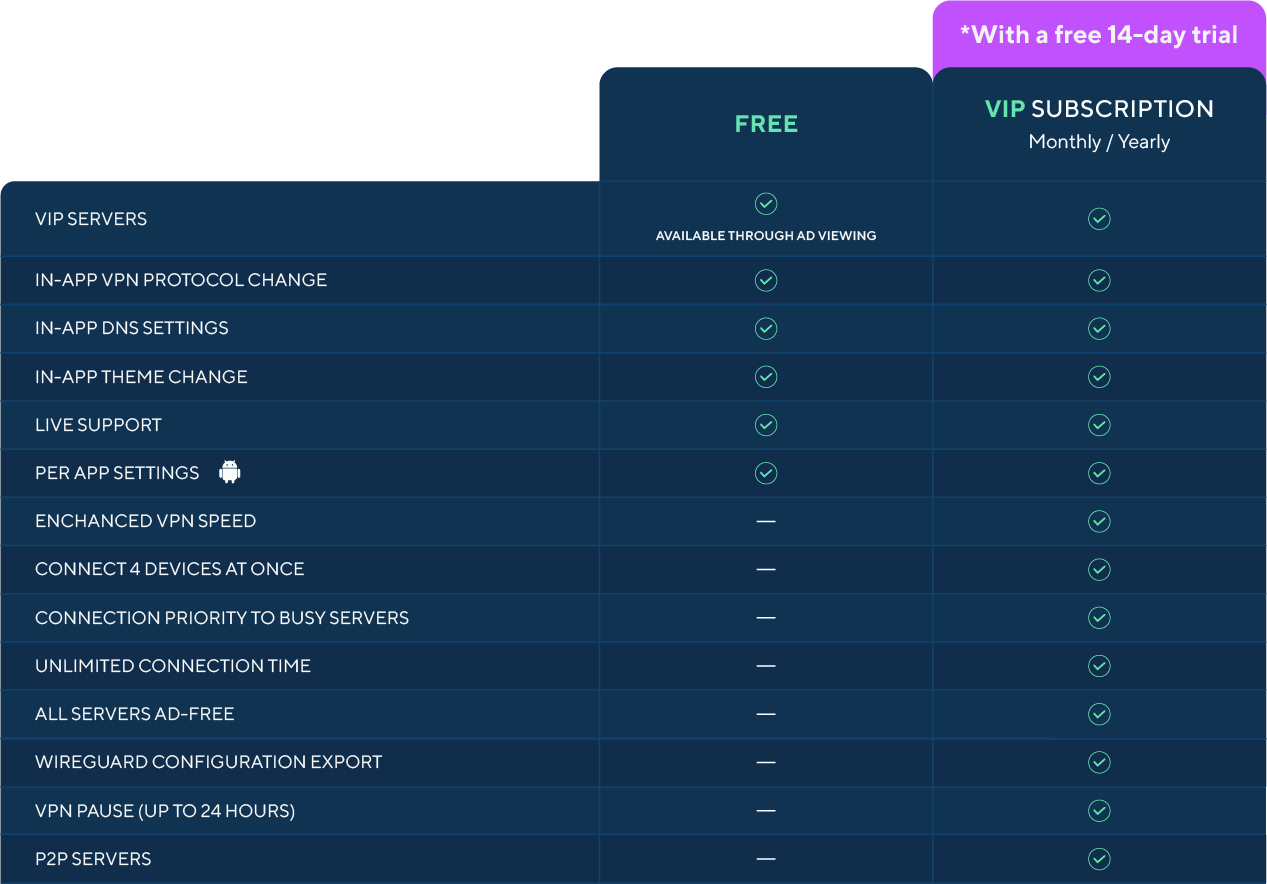
On the table below you can see the benefits of using Octohide VPN FREE vs. PAID.
What If Something Doesn’t Work?
No worries - our support team is always ready to help.
If your VIP doesn’t appear on another device, or you’re unsure whether you’re using an auto account or a registered account, just contact support and we’ll help:
-
Link your VIP correctly
-
Recover access
-
Set up your account for multi-device use
You can find all of our support materials here:
If you still experience problems activating VIP on other devices, you can contact us here:
- Contact form
- Via e-mail: [email protected]
Final Thoughts
Octohide VPN VIP is designed to protect more than just one device. Whether you’re on your phone, TV, laptop, or multiple devices at once, VIP makes it easy to stay connected, private, and secure.
To get the best experience, we recommend using a registered account and taking advantage of QR code login for fast and easy device activation.
Download Octohide VPN and upgrade to VIP to protect up to 4 devices today.